Sugar Rush Mobile Play
Playing Pragmatic Play's Sugar Rush slot on a mobile device offers the same core experience as on desktop, with some practical considerations for phone and tablet users. The game's 7x7 grid, cluster pays mechanics, and features like cascading wins and free spins are fully functional on smaller screens.
This page details the technical and practical aspects of mobile play, from accessing the game via a browser or casino app to optimising performance and settings for your device. The information is specific to the Sugar Rush slot and its high-volatility gameplay.
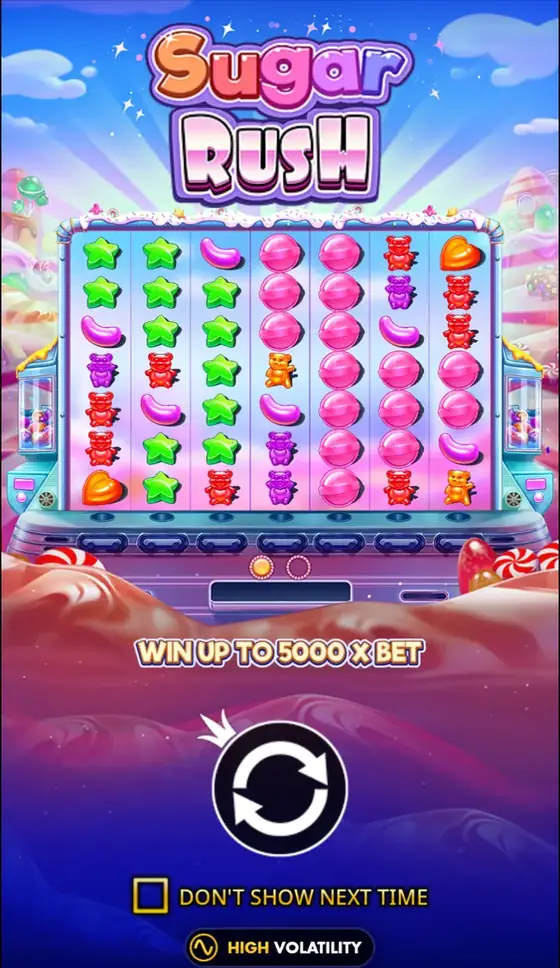
Accessing Sugar Rush on Mobile
You can play Sugar Rush on a mobile device in two primary ways: through a mobile web browser or via a dedicated casino application. The browser version requires no download and loads directly when you visit a casino site that hosts the game. This is the most common method and works on both iOS and Android. Casino apps, where available, can be downloaded from official app stores. These apps may offer faster loading times or push notifications for promotions, but the game itself is identical.
For real-money play in Nigeria, ensure you are using a site licensed by the National Lottery Regulatory Council and relevant state gaming authorities. The game's minimum bet is $0.20, which will be converted to the local currency, ₦, by the casino platform based on the exchange rate.
iOS and Android Compatibility
Sugar Rush is built with HTML5 technology, making it compatible with modern iOS and Android devices. On iOS, it runs on Safari and other browsers, typically requiring iOS 10 or later. For Android devices, Chrome is the most common browser, and the game supports Android 5.0 (Lollipop) and newer versions. The game should perform well on mid-range and flagship phones from the last four to five years.
Older devices with less RAM or slower processors may experience longer loading times or occasional lag during complex tumble sequences with many multipliers. The visual quality and all game rules, including the 96.50% RTP and high volatility, remain consistent across platforms.
Portrait and Landscape Layouts
The game's 7x7 grid is designed to fit both portrait and landscape orientations, but the experience differs. In landscape mode, the grid is larger and more central, closely resembling the desktop view. The paytable and control panels are usually positioned to the sides.
In portrait mode, the grid is displayed vertically, often with game controls placed below it. This can make it easier to play with one hand. Some players find portrait mode better for tracking the build-up of position multipliers during the free spins round, as more of the grid is visible at once without scrolling. You can switch orientations during play, and the game will re-adjust.
Mobile Performance and Settings
Performance is generally smooth on capable devices. The cascading wins and symbol explosions are graphics-intensive but are optimized for mobile. If you experience slowdown, closing other apps can help. Playing on a Wi-Fi connection is recommended for stability, especially during bonus rounds. Data usage is moderate. Loading the game for the first time may use 10-20 MB of data. Subsequent sessions use less data as assets are cached. Continuous play for an hour might use 30-50 MB. The colourful graphics and constant animations can drain battery life more quickly than static apps. Lowering screen brightness can extend play time.
Several in-game settings can enhance mobile play. The 'Turbo Spin' or 'Quick Spin' option speeds up the tumble animation. The sound and music can be toggled off to save battery or for discreet play. Where allowed by the casino platform and local regulation, the Autoplay feature can be configured with loss and single win limits. For example, you could set it to stop if your balance decreases by a set amount in ₦. This is a responsible gambling tool. The 'Buy Feature' option to instantly trigger free spins for 100x your bet, if available, functions the same as on desktop.
Mobile vs. Desktop Play Comparison
| Aspect | Mobile Play | Desktop Play |
|---|---|---|
| Access | Browser or dedicated app | Web browser only |
| Controls | Touch screen taps and swipes | Mouse and keyboard |
| Screen Layout | Adapts to portrait or landscape | Fixed widescreen layout |
| Portability | High, play anywhere | Limited to computer location |
| Battery Impact | High, drains phone battery | Negligible on a plugged-in PC |
| Data Usage | Moderate on cellular data | Typically uses fixed broadband |
Safe and Responsible Play on a Phone
Playing on a mobile device offers convenience but requires the same responsible approach as on desktop. Set time and deposit limits using your casino account tools before you start a session. The ease of access can lead to longer play sessions, so taking regular breaks is advised.
Ensure your device is secure with a passcode. Avoid playing on public Wi-Fi networks for real-money sessions to protect your account details. Remember that the game's high volatility means wins are less frequent but can be larger when they occur, with a maximum win of 25,000x your stake. The game is for entertainment and is intended for players aged 18 and over.
Sugar Rush: questions and answers
Do I need to download an app to play Sugar Rush on my phone?
No, you do not need a specific app for Sugar Rush. The game runs directly in the mobile web browser of most online casinos. Some casinos may offer their own dedicated apps, but the game experience inside them is the same.
Does the game look different on a mobile phone?
The core game grid and symbols are identical. The interface may be rearranged to fit the smaller screen, with controls often placed below the 7x7 grid in portrait mode. All features, including cascading wins and multipliers, function fully.
Will playing on mobile use a lot of my data?
Data usage is moderate. The initial load uses the most data. After that, an hour of continuous play might use approximately 30-50 MB. Playing on Wi-Fi is recommended to avoid cellular data charges.
Can I play in both portrait and landscape mode?
Yes, Sugar Rush supports both orientations. You can rotate your device during play, and the game will adjust the layout automatically. Some players prefer landscape for a larger grid view.
Are the game's RTP and volatility the same on mobile?
Yes. The mathematical model is unchanged. The game retains its default 96.50% Return to Player (RTP) rate and high volatility whether played on desktop, mobile browser, or a casino app. Note that operators can sometimes choose a lower RTP version.
How can I manage my play responsibly on a mobile device?
Use the responsible gambling tools provided by your casino account, such as deposit and session time limits. The in-game Autoplay feature can also be set with stop limits. Playing on a phone should not change your approach to budgeting and taking breaks.